
Agar aapko MS Word me Portrait se Landscape or landscape se Portrait orientation change karna hai, to yeh blog aapke liye perfect hai. Chahe aap ek wide table bana rahe ho, certificate design kar Rahe ho, ya koi project report taiyar kar rhe ho –page orientation shi hona bahut zaroori hai.
Is post me hum aapko simple aur aasan steps batayenge jisse aap page orientation ko pure document ya sirf ek page ke liye change kar skte ho.
📌 Page Orientation kya hoti hai?
Page Orientation ka matlab hota hai – page Ki direction, yaani aapka document vertically dikhega ya horizontally.
MS word Mein do tarike Ki orientation hoti hain:
✅Portrait: page vertical hota hai (default setting)
✅Landscape: Page horizontal hota hai
✅ MS Word Mein puri Document Ki Orientation kaise change kare?
Agar aap puri document Ko landscape ya portrait mein convert karna chahte hain, toh ye steps follow karein:
Apna word document open kre
✅ Layout tab me click kare
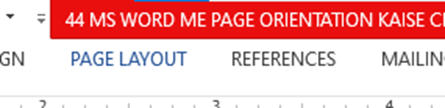
✅Orientation option me click kare
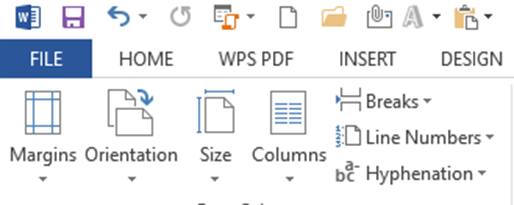
✅Portrait ya Landscape me se koi bhi select kare.
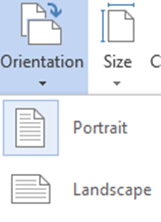
Aapka document orientation me convert ho jayega.
🎯Sirf ek page ka orientation kaise change kare?
Kya aap sirf ek ya kuch specific pages ka orientation change krna hain? To iske liye yeh steps follow karein:
- Us page ka starting me cursor rakhein jiska orientation aapko change karna hai.
- Layout> breaks > Next page me click karein –section break insert hoga.
- Ab Orientation > landscape ya portrait select karein.
- Us page ke baad ek aur section break daal ke original orientation wapes set karein.
Yeh tab useful hota hai jab aapko sirf ek wide chart ya table dikhna ho ek page par.
📝Page setup dialog box shortcut
Ager aap directly page setup box open karna chahte hain:
📌 Press kare: alt +P+S+P
Yahan se aap:
Orientation set kar skte hai
🤔Conclusion
Ab aap Sikh Gaye hai ki MS word me page orientation kese change kiya jaata hai chahe vo document puri file ke liye ho ya sirf ek particular page ke liye simple aur aasan steps bataye jisse aap page orientation ko pure document ya sirf ek page ke liye change kar skte ho.
Ager aapko yeh post pasand aayi to comment karein, share karein aur hamare blog pctips.in ko bookmark krna Na bhoolein.🙏






Leave a Reply