
Computer Fundamentals: Computer Basic
Computer have become one of the most essential parts of human life. At present, computers can be easily seen in almost every sector of fields even where it is most unexpected. There can be several different reasons for the requirement of computers in three words: efficiency, accuracy, and reliability.
Nowadays, computers are making jobs easier for people. Computers can be used in everything from entertainment to communication to navigation to research. That is why this era is called the era of IT (Information Technology). And now,one cannot imagine a world without computers.
Therefore, it is very necessary to have knowledge of Computer basics. In this article, we have covered all the basic of the computer such as what a computer is, definition of computer, classification or types of computers advantages and disadvantages of a computer, etc.
Prerequisites
There is no special requirement to learn the concepts of computer fundamentals Tutorial. You just need to read the article properly. We have a well built and organized series of topics under Computer Fundamentals to help you in learning computer concepts from scratch.
Audience
Tutorials on Tutorials Mate are designed to help beginners and professions. Our Computer Fundamentals Tutorial will help beginners to master’s in computer.
Problem
Our Computer Fundamentals Tutorial is designed by professionals, and we assure you that you will not find any kind of problem. In care there is any mistake, we request you to submit the problem using the contact form or directly send us a mail at Tutorial Mate.
Let’s start with the definition.
What is Computer?
In 1640, the term ‘Computer’ was initially referred to as one who calculates Later in 1897 it was called the Calculating Machine In 1945 it was indicated as programmable digital electronic computer which is now called a computer.
What is Computer Definition?
“A computer i a programmable electronic machine designed to take input, problem prescribed arithmetic and logical operations at fast speeds and provide the output of these operations.”
The term COMPUTER is an acronym for ‘Common Operating Machine Purposely Used for Technological and Educational Research’.
The term ‘Computer is derived from the Latin word ‘ ‘Computare’, which is defined as-“to calculate.”, “to count” or to sum up, etc. In other worlds.” a computer is a device that performs computation.”
| NOTE: – The first mechanical computer was designed in 1837 by Charles Babbage. It was called ‘ Analytical Engine.’It was first general-purpose computer. Charles Babbage is know as the father of the computer. |
BASIC FUNCTION OF COMPUTER
There are four basic functions of the computer: Input, Processing, Output, and Storage.
INPUT
The data is entered into the computer with the help of input devices. Like other electronic devices, a computer takes data in raw form.The user can enter the data in several formats such as the collections if letters, numbers, images. etc. The input devices convert the data in the binary form so that the computer can read the data.
Some of the main input devices of computer system are listed below:]
- Keyboard
- Mouse
- Joystick
- Scanner
- Trackball
- Light-pen
Processing
The processing is the core functionality of the computer system. It is the internal process were the data is processed according to the instructions given to the computer The data is executed sequentially and sent for further processing.
The processing speed may vary in different computer systems as the speed mainly depends upon factors like which type of motherboard, CPU( Central Processing Unit )or RAM (Random Access Memory) you are using.
Output
The output is the information provided by the computer after the entire processing. It is also known as the result that can be stores in storage device for further use. The output devices retrieve the processed data from the computer and convert the data into a human readable form.
The widely used output devices of computer systems are listed below:
- Monitor
- Printer
- Projector
- Speakers
Storage
Storage is a crucial part of the computer system. It is used to store data or instructions before and after processing.
Primary Storage
Primary storage devices store the inputted data and immediate calculation results. The data stored in primary storage devices is temporary and will be lost if they are disconnected from the power source. Random Access Memory is an example of primary storage.
Secondary Storage
Secondary storage devices are used to store the data permanently for future use. The data stored in the secondary storage devices is secure even if there is no power supply. Hard Disk Drive is the widely used secondary storage.
Generation of Computer
Each generation of computer is a major technological development in technology a computer is/was being based on. Initially, the term ‘generation of computer’ was used to distinguish between different hardware technologies. At present, the term concluded both the hardware and software. More precisely, the term generation is the development that changes the way computers operate. There can be different changes like making the device smaller, cheaper, more smart or powerful etc..
There are five generations of computer, which are listed below with approximate period:
First Generation (1946-1959)
Based on – Electronic Valves (Vacuum Tubes).
Example– ENIAC, EDVAC, UNIVAC, etc.
Second Generation (1956-1971)
Based on –Transistors.
Example – IBM 1620, IBM 1400 and 7000 series, CDC 3600 etc.
Third Generation(1965-1971)
Based on – Integrated Circuits (ICs).
Example –IBM 360, IBM 370, PDP, etc..
Fourth Generation(1971-1980)
Based on –Vary Large Scale Integrated (VLSI)Circuits.
Example – DEC 10, STAR 1000, CRAY-1 and CRAY-X-MP, etc.
Fifth Generation (1980-Present)
Based on –Ultra Large Scale Intergration (ULSI), Artificial Intelligence (AI) and Parallel Processing Hardware.
Example – Desktop, Laptop, Notebook, Chromebook, and Ultra Book, etc.
Uses Of Computer
As we have discussed above, the computer is the need for the digital era. It is helping people to computer their tasks in hours that were before taking several days or months.
Here, we have explained the most important used of the computer system:
- can store important data.
- can communicate with people around the world.
- used for the educational system.
- used for banking, finance, and marketing.
- used in government sectors.
- used in sports.
- used for Press and publishing.
- used for entertainment.
Classification of Computer
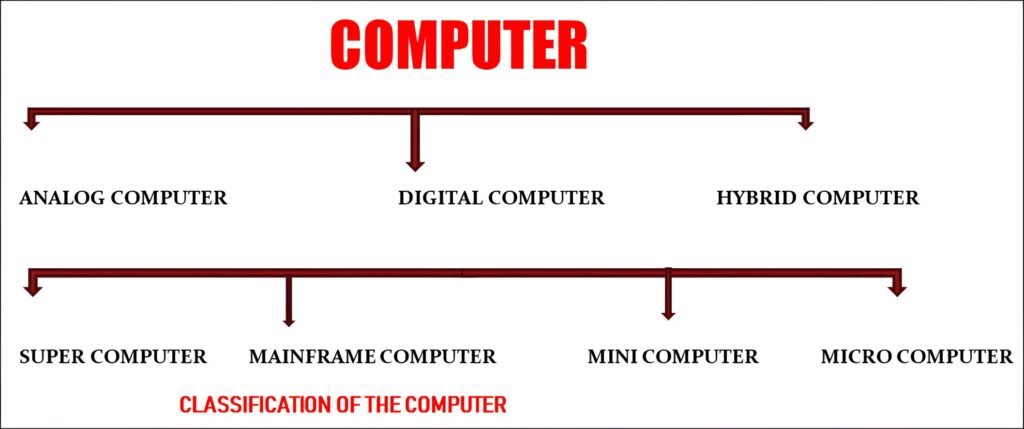
According to usage and functionalities, computer can be classified as:
Analog Computer –
The computer used to process analog data are called ‘Analog Computers’ Analog computers are the most complicated machines for computation and process control. Examples of continuous data are pressure, temperature, voltage,weight,and speed ,etc.
Digital Computer-
Digital Computer are personal computers. These are the widely used computers. These are commonly used for processing the data with a number using digits by utilizing the binary number system. These computers are intended to perform arithmetic and logical operations at a very high rate.
Hybrid Computer-
Hybrid computers are the combination of analog computers and digital computers. These are as fast as analog computers and include memory and precision as digital computer.
Types of Computers
Supercomputer-
Supercomputers are large and require huge space for the installation. They are the fastest and most expensive computers compared to others. They used for performing huge complex calculations.
Mainframe computer-
Mainframe Computers are smaller than supercomputers, still, they comparatively huge. These are not as fast as supercomputers. These are expensive as well as take huge space for the entire setup. Mainframe computers can store huge amounts of data and they are capable to handle large calculations. These computers are usually found in banks and educational sectors.
Microcomputer
Microcomputers are inexpensive and support multi-user platform. Therse type of computers is mostly used by small organizations. Microcomputers are slower compared to supercomputers and mainframe computers. Microcomputers are called Personal Computer (PC).
Minicomputer
Mini computers are cheaper and easy to carry. Notebook and tablet are examples of minicomputers.
Advantages and Disadvantages of Computer
Just like a coin, a computer system also has two sides/: Advantages and Disadvantages. While there are several disadvantages of a computer system, but the advantages overcome them. Let’s discuss both advantages and disadvantages of the computer system.
Advantages of Computer
The main advantages of the system are listed below:
- Amazing Speed
- Accuracy Speed
- Accuracy
- Huge Storage
- Multitasking Support
- Data Security
- Automation
- Reduced Cost
Disadvantages of Computer
The main disadvantages of the computer system are listed below:
- Unemployment
- Health Issuses
- Cyber Crimes
- Virus and Hacking Attacks
- Improper Use
- Spread of False or Inappropriate Content
- Negative Impact on the Environment
Computer Software
Computer software is a group of programming instructions designed to instruct the computer to problem to perform specific tasks. Typically, a computer system is useless without software.
There are two types of computer software, as mentioned below:
System Software
System software connects the user and the hardware of the computer to interact with each other. System software provides the basic functionalities required to operate the computer system. These types of software provide an environment or platform for the other software to work on. System software run in the background.
Example: Operating system (e.g., Window, Linux, Android, etc.) Device Drivers, Firmware, and Utility software.
Application Software
Application software is customized software designed for personal use. These type f software help users for performing basic tasks such as online research, setting an alarm, designing, or even playing games. The application software runs in the frontend and mostly used by the end-users. Therefore, these are also called ‘end-user programs’.
Example: – Word Processing, Multimedia Software, web Browsers, Graphic Software, Photoshop Software, hardware can be installed inside or outside of the computer physical body.
Components of the Computer Hardware
The basic components of the computer hardware are listed below:
- Monitor
- Keyboard
- Mouse
- CPU
- Motherboard
- RAM
- Hard disk Drive
- Printer, etc.





Leave a Reply