
Clip Board Group:
Clip Board Group: – क्लिपबोर्ड ऑपरेटिंग सिस्टम या एप्लीकेशन में एक सुविधा है जो किसी दस्तावेज या अन्य स्थान से कॉपी या कट किये गए डेटा को अस्थाई रूप से संग्रहित करता है, जिससे उपयोगकर्ता इसे कंही स्थानातरित या डुप्लीकेट कर सकता है क्लिपबोर्ड में निम्न चार टूल्स होते है
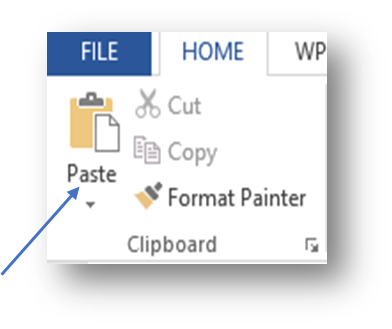
Clip Board Group: - The clipboard is a facility in an operating system or application that temporarily stores data that has been copied or cut from a document or other location, allowing the user to move or duplicate it elsewhere. The clipboard contains the following four tools)
Paste :-
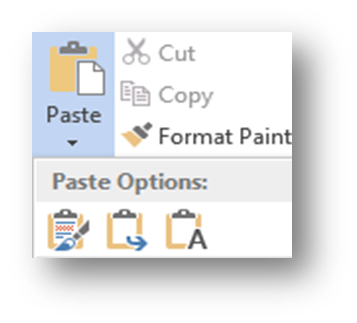
Paste :- किसी टेक्स्ट्स को एक से ज्यादा बार टाइप करने के लिए उसको कॉपी किया जाता है और पेस्ट key के माध्यम से उसे पेस्ट किया जाता है जिसे हम एक टेक्स्ट्स को कई लिख सकते है यह चार प्रकार के होते है
(Paste: - To type a text more than once, it is copied and pasted using the paste key, using which we can type a text multiple times. It is of four types.)
- Keep source formatting
- Merge formatting
- paste special
- set default paste
Keep source formatting :-
- Keep source formatting :-ms वर्ड में , keep source formatting का इस्तेमाल कॉपी पेस्ट किये गए सभी टेक्स्ट्स के स्त्रोत में फॉर्मेट बना के रखना है
• Keep source formatting: – In MS Word, keep source formatting is used to maintain the format in the source of all the copied pasted texts
Merge formatting:-
- Merge formatting:-यह हमारे डाटा जो की कट कॉपी और पेस्ट किया गया है उस पुरे डाटा को मर्ज करता है
Merge formatting: – It merges all our data which has been cut, copied and pasted.
- Keep with text only:-यह हमारे टेक्स्ट को मार्कर करता है जिसमे केवल Keep text याkeep text together को सेलेक्ट किया होता है
Keep with text only: – It marks our text in which only Keep text or Keep text together is selected.
- paste special :जब आप किसी टेक्स्ट या इमेज को कट या कॉपी कर लेते है तब use इच्छित स्थान पर रखने से लिए paste कमांड का प्रयोग किया जाता है यह हमारा फवरेट option है क्लिपबोर्ड क्या करता है की आप जो भी आइटम को कट कॉपी या पेस्ट करते है उसका डाटा स्टोर रखते है
(Paste Special: When you cut or copy any text or image, then paste command is used to place it at the desired location. This is our favorite option. What the clipboard does is that it stores the data of whatever item you cut, copy or paste.)
- set default paste: default रूप से, जब ctrl +V पेस्ट बटन या right क्लिक +पेस्ट का उपयोग करके दस्तावेज में सामग्री पेस्ट करते है , तो word मूल स्वरूपण को सुरक्षित रखता है default को बदलने के लिए इन चरणों का पालन करे1. फ़ाइल् >विकल्प >उनत पर जाये
(Set default paste: By default, when you paste content into the document using ctrl+V paste button or right click+paste, word preserves the original formatting. To change the default follow these steps 1. Go to File>Options>Advanced)
CUT (ctrl+x)
CUT (ctrl+x)
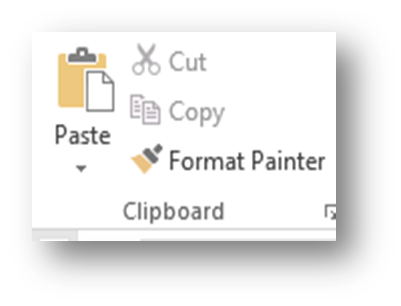
इस विकल्प का उपयोग ms वर्ड में सेलेक्ट किये गए टेक्स्ट्स पिक्चर या ऑब्जेक्ट को एक स्थान से हटा कर दुसरे स्थान के लिए किया जाता है इसका शॉर्टकट की ctrl+x होता है
(This option is used in MS Word to move selected text, picture or object from one place to another. Its shortcut key is ctrl+x.)
COPY (ctrl+C )
COPY (ctrl+C )
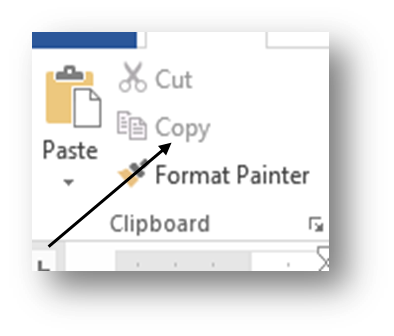
इस option का उपयोग ms वर्ड में डाटा की एक से अधिक कॉपी बनाने के लिए किया जाता है कॉपी करने के लिए हमे us टेक्स्ट पिचर या ऑब्जेक्ट को सेलेक्ट करना होगा सेलेक्ट करने के बाद होम tab ले क्लिपबोर्ड ग्रुप में जाकर कॉपी option को सेलेक्ट करे और कॉपी करे
(This option is used to make more than one copy of data in MS Word. To copy, we have to select the text picture or object. After selecting, take the home tab, go to the clipboard group and select the copy option and copy.)
FORMAT PAINTER :-
FORMAT PAINTER :-माइक्रोसॉफ्ट वर्ड में फॉर्मेट पेंटर का इस्तेमाल करके एक ऑब्जेक्ट से फोर्मेत्टिंग कॉपी करके उसे दुसरे ऑब्जेक्ट पर लागू किया जा सकता है , इसे फोर्माटिंग करने के लिए कॉपी और पेस्ट करने के तोर पर समझा जा सकता है फॉर्मेट पेंटर का इस्तेमाल करके, रंग फॉण्ट , स्टाइल , आकर , बॉर्डर स्टाइल , टेक्स्ट्स के कई तोक्दो पर एक ही फोर्माटिंग को जल्दी से लागू किया जा सकता है
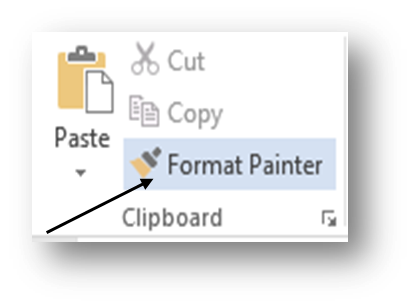
(Using the Format Painter in Microsoft Word, you can copy formatting from one object and apply it to another object; this can be thought of as copying and pasting to apply formatting. Using the Format Painter, you can quickly apply the same formatting to multiple pieces of text, such as color, font, style, size, border style, etc.)






Leave a Reply